How it works.
A $15 adapter plugs into the socket under your dashboard. A laptop plugs into the adapter. The program then reads what the engine computer is reporting: the live sensors, the stored faults, and the vehicle’s own self-test results. This page walks through what happens at each step, and what every screen is for.
On this page
From the socket to the screen
Plug in the adapter
Every car sold in the US since 1996 has an OBD2 socket, nearly always under the dashboard on the driver’s side. Any ELM327-style adapter fits it. A USB cable is the one tested against a real car; a Bluetooth adapter you have paired in Windows shows up as a COM port and works the same way. Wi-Fi and Bluetooth LE adapters are supported too, marked BETA until they have met a vehicle.
Ignition on, press CONNECT
The program wakes the adapter, finds the protocol the car speaks, and asks the vehicle which sensors it supports. It reads the VIN, the check-engine light, the stored codes and the readiness monitors in the same breath. None of that needs the engine running. The status strip says what it is doing the whole way, and if a step fails it says what went wrong and what to try.
Watch, record, scan
Thirty readings arrive about three times a second and land on the dashboard, the graphs, the fuel map and the trip computer at once. Press REC and the whole drive is written to a file, in a folder you choose. FULL SCAN walks everything else the car will volunteer: freeze frame, on-board self-tests, every supported sensor.
Come back to it
A recorded drive plays back through the same gauges, so a fault can be looked at again after the car is parked. The analysis turns a drive into plain sentences. Two recordings side by side show what a repair changed. And one document, in English or Spanish, goes to the mechanic, the buyer or the drawer.
Every screen, and what it is for
The program is arranged the way the sidebar is: what is happening now, what the vehicle has stored, what you have kept, and how it is set up.
Live
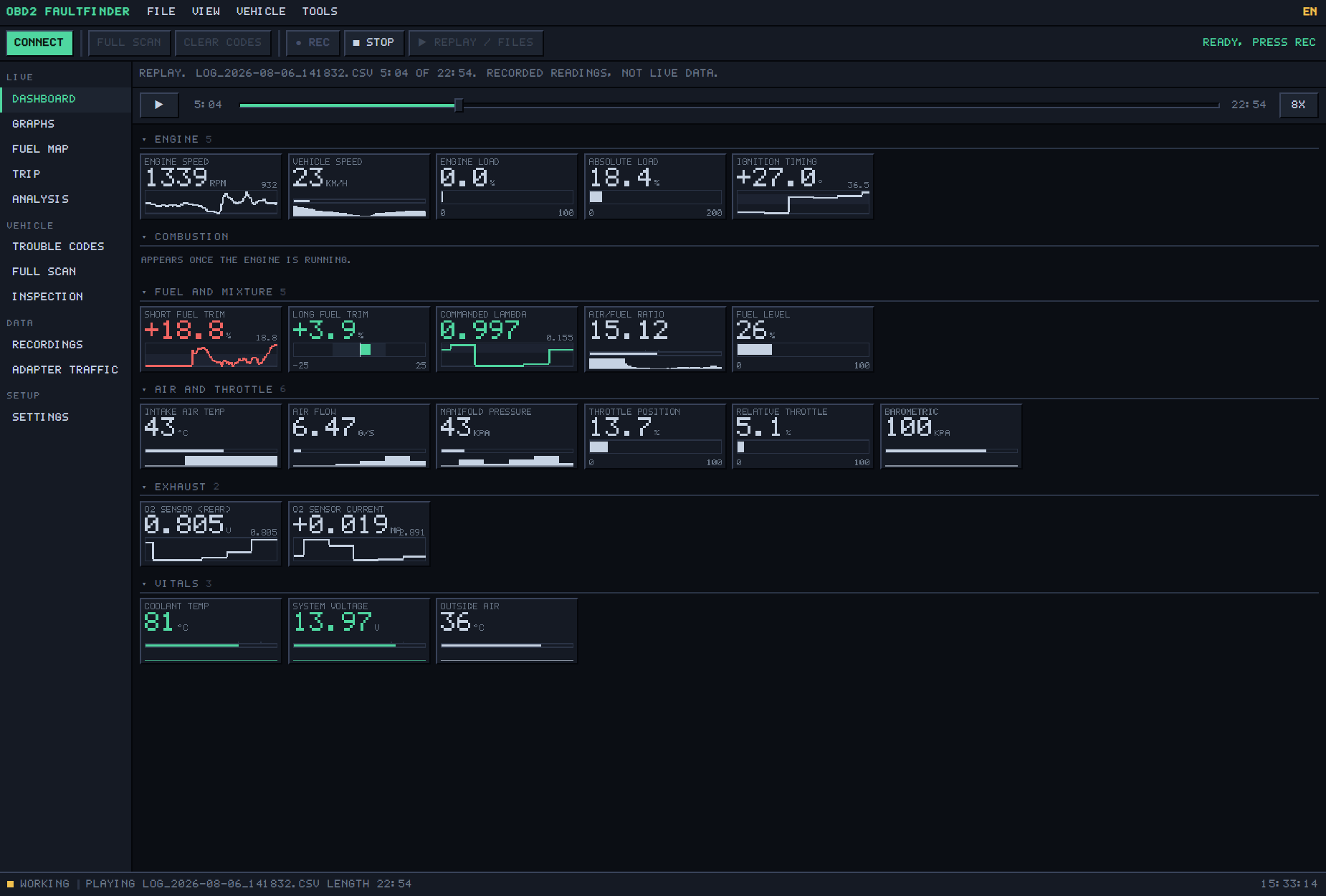
Dashboard Free
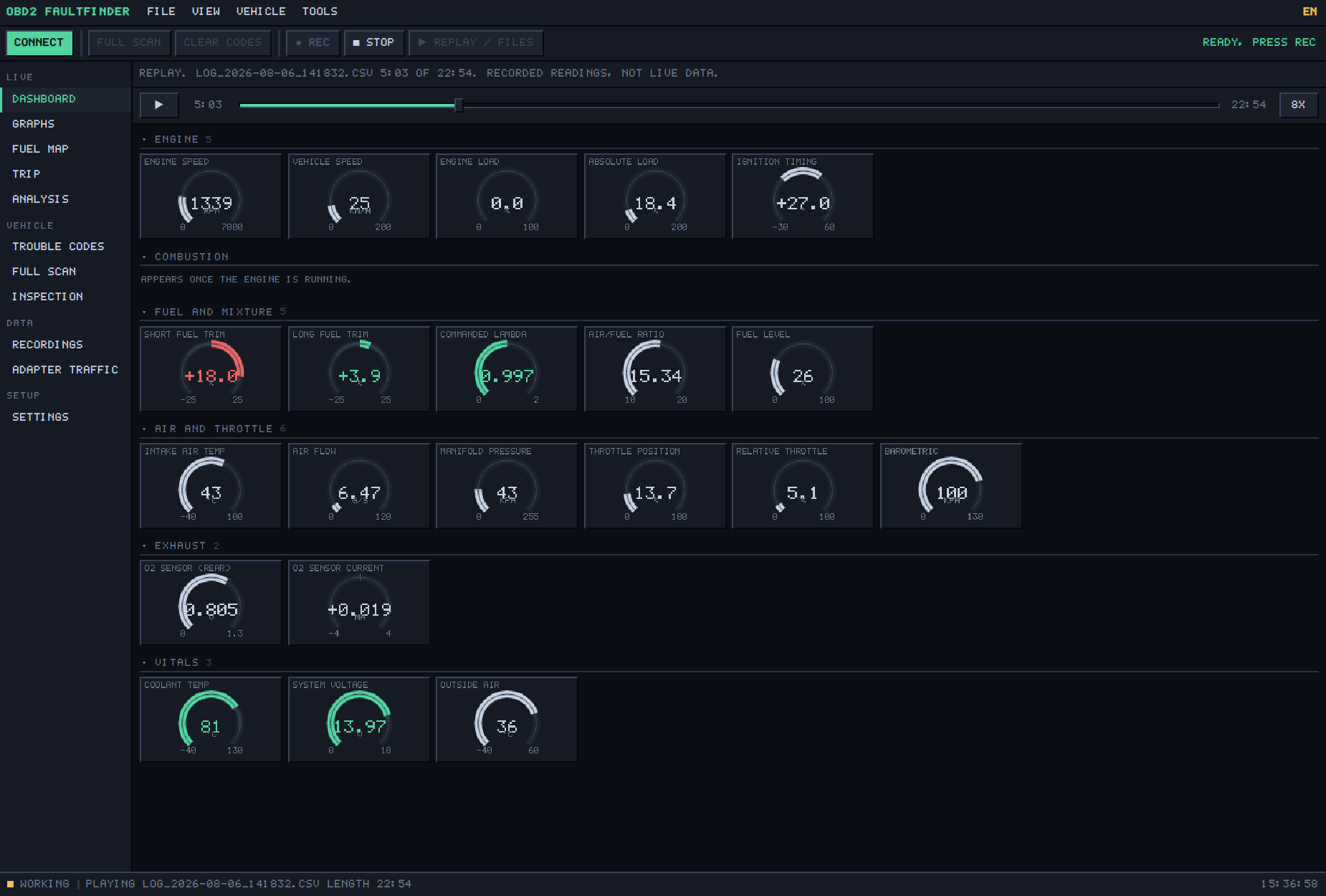
Thirty readings straight off the engine, grouped the way a mechanic thinks about them: engine, misfire count, fuel and mixture, air and throttle, exhaust, vitals. Each card carries the number, its unit and a short trace of where it has been, and turns red when the reading is out of its normal range — a long fuel trim past ten percent, a coolant temperature that has not climbed.
- Numbers, bars or traces on every card. A key adds needle gauges and a full instrument cluster.
- Engine off, key on: readings that only exist while the engine turns show “--”, never a misleading zero.
- Per-cylinder misfire counters appear once the engine is running, on cars that report them.
Graphs Free
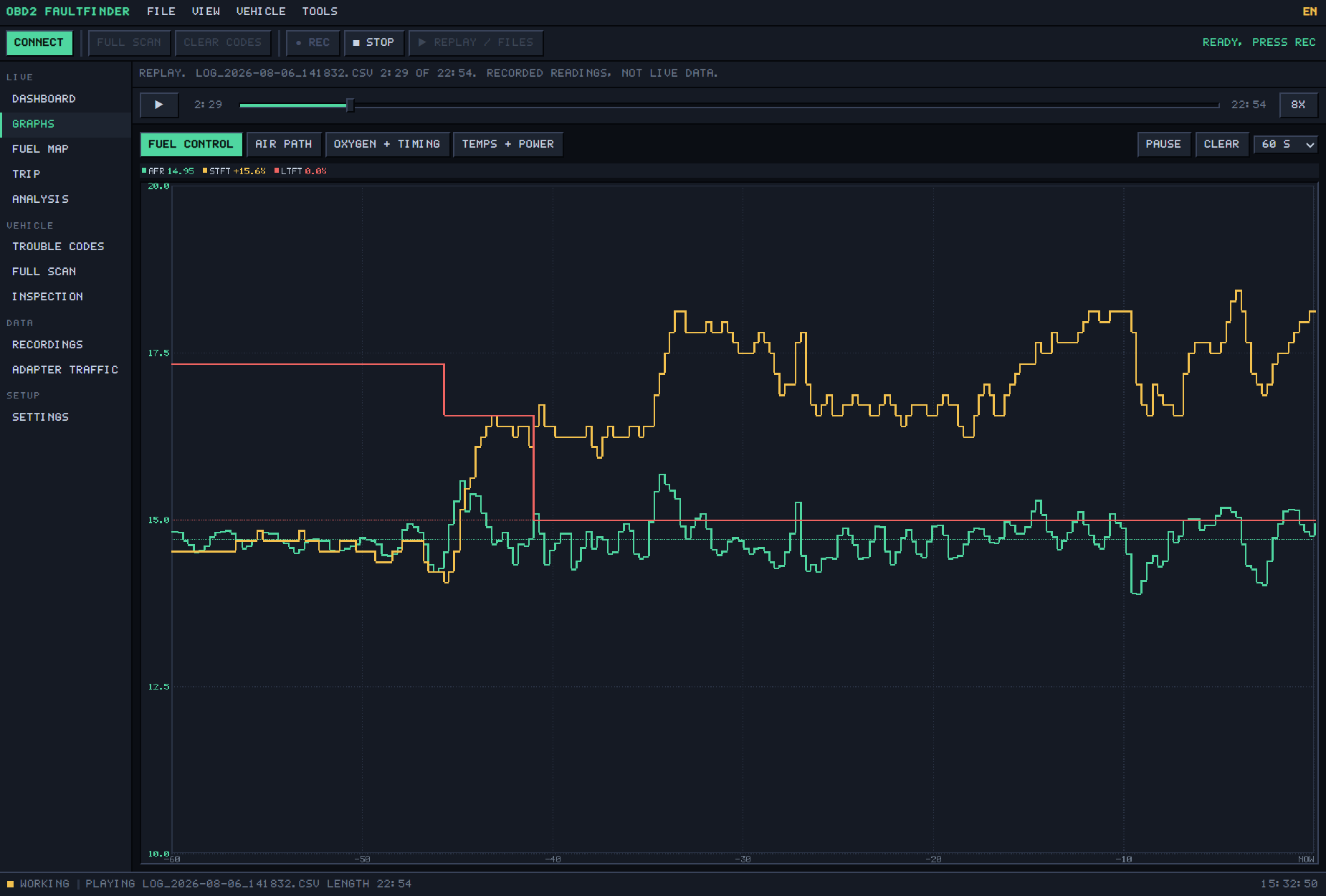
Four preset groups of traces, each on its own vertical scale so air/fuel ratio and manifold pressure can share a time axis without one flattening the other. Reference lines sit behind the data — 14.7 for the mixture, zero for the trims — because that is what you are actually comparing against.
- Fuel control · Air path · Oxygen and timing · Temperatures and power.
- A window of 30 seconds to 5 minutes. Pause to read a moment, clear to start over.
Fuel map Free
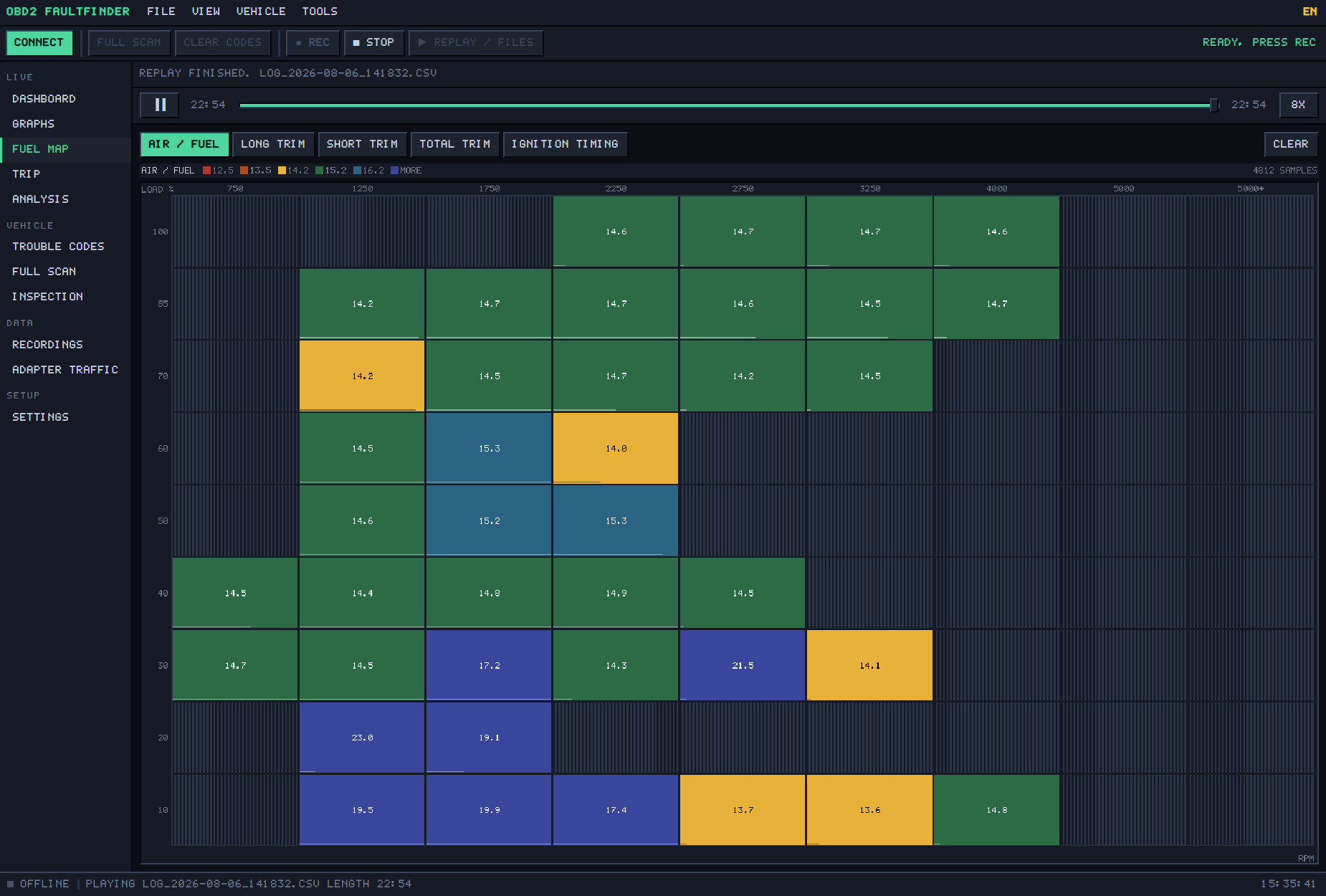
The time graphs answer “is it running lean”. This answers WHERE — a grid of engine speed against load, each cell averaging what the engine did there. Cells fill in as you drive. A cell you have not driven in stays hatched and says so; nothing is interpolated or invented.
- Map the air/fuel ratio, the long trim, the short trim, the total trim, or the ignition timing.
- A vacuum leak paints the low-load column and leaves the rest alone. A sensor that misreports smears across the whole map. That difference is the diagnosis.
Trip Free
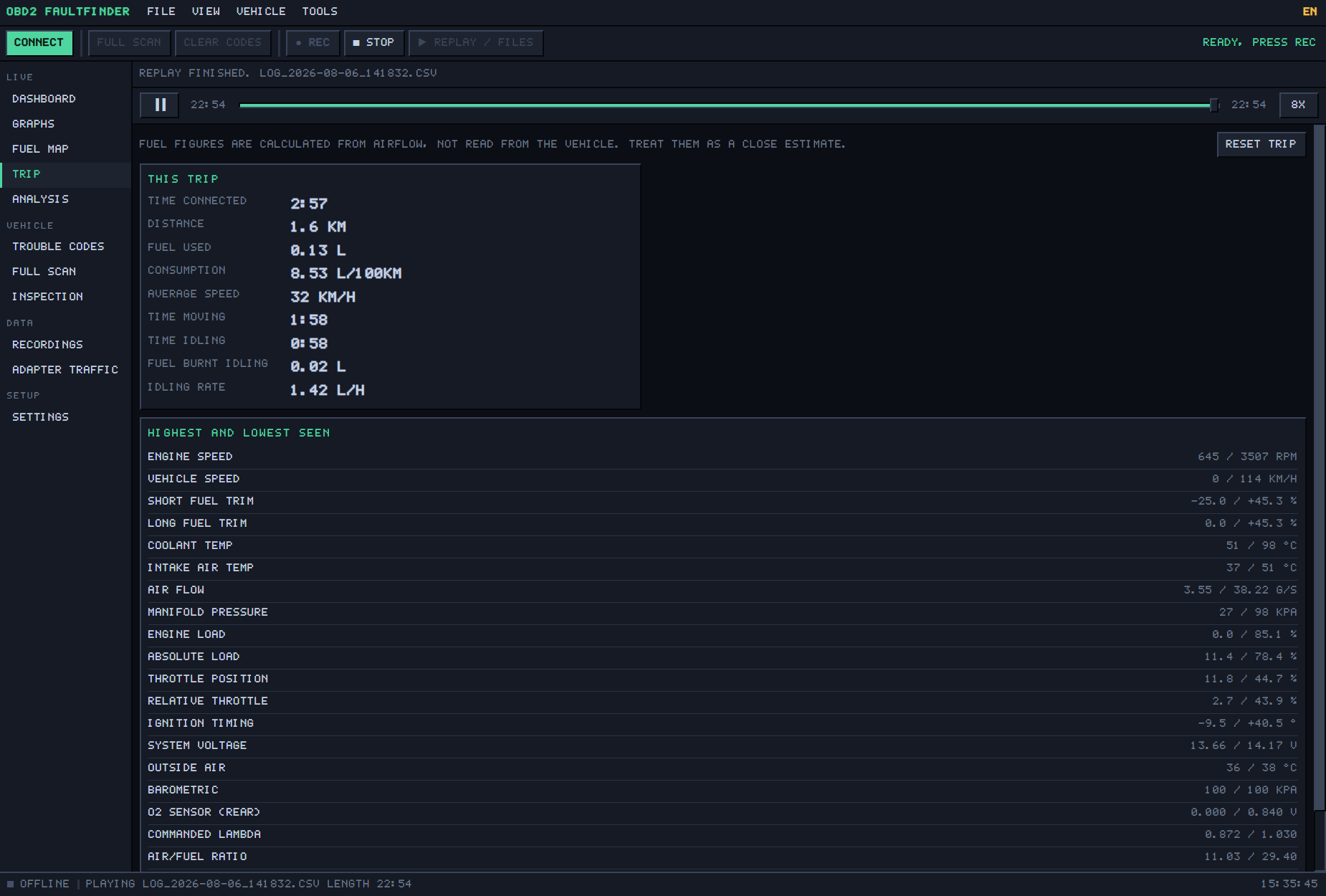
Time connected, distance, fuel used, consumption, average speed, time moving against time idling and the fuel burnt idling. Below it, the highest and lowest value every sensor reached on this trip — the quickest way to see whether the coolant ever got warm or the voltage ever sagged.
- Fuel is calculated from air flow, the way every trip computer does it, and the screen says so. Treat it as a close estimate.
Analysis With a key
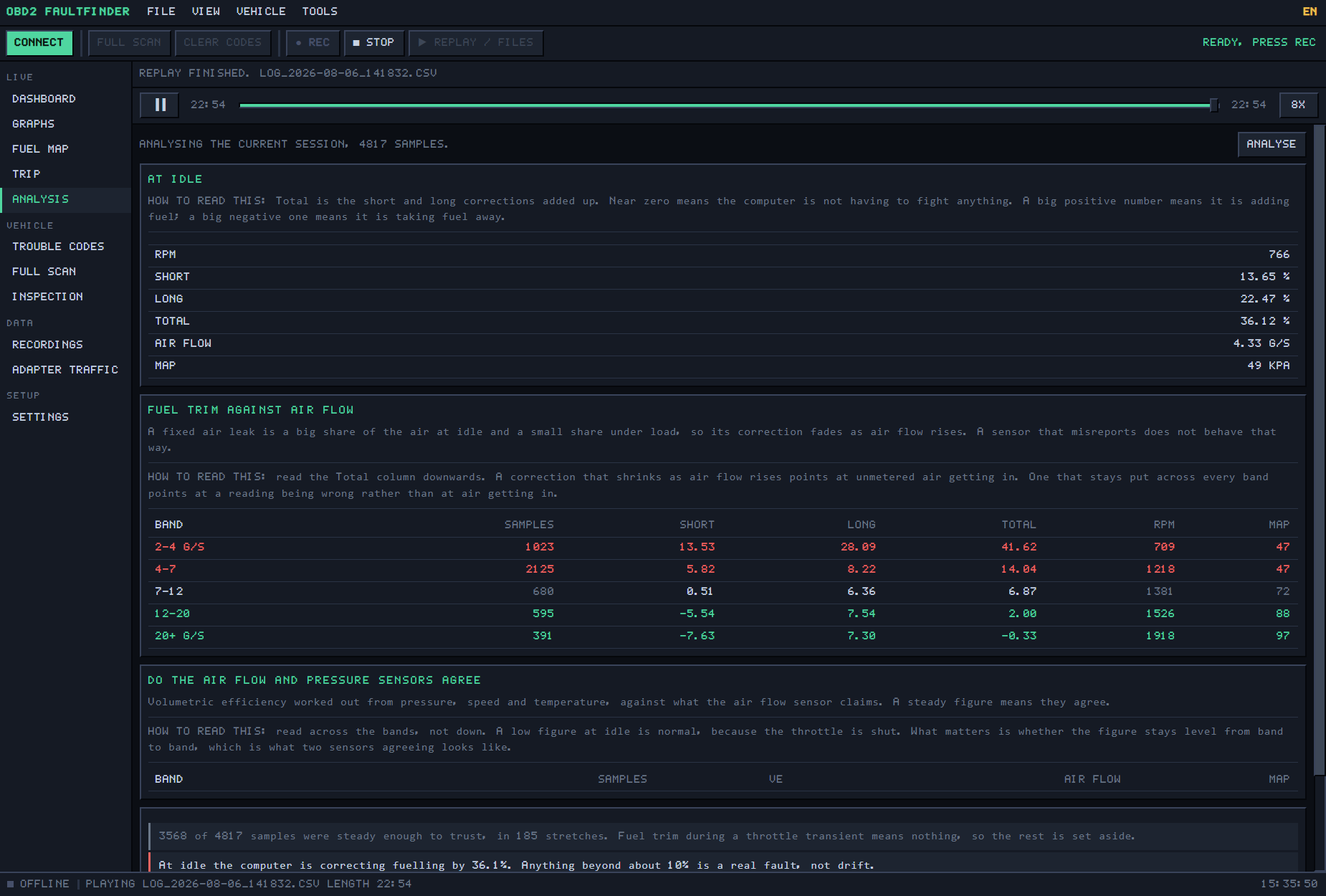
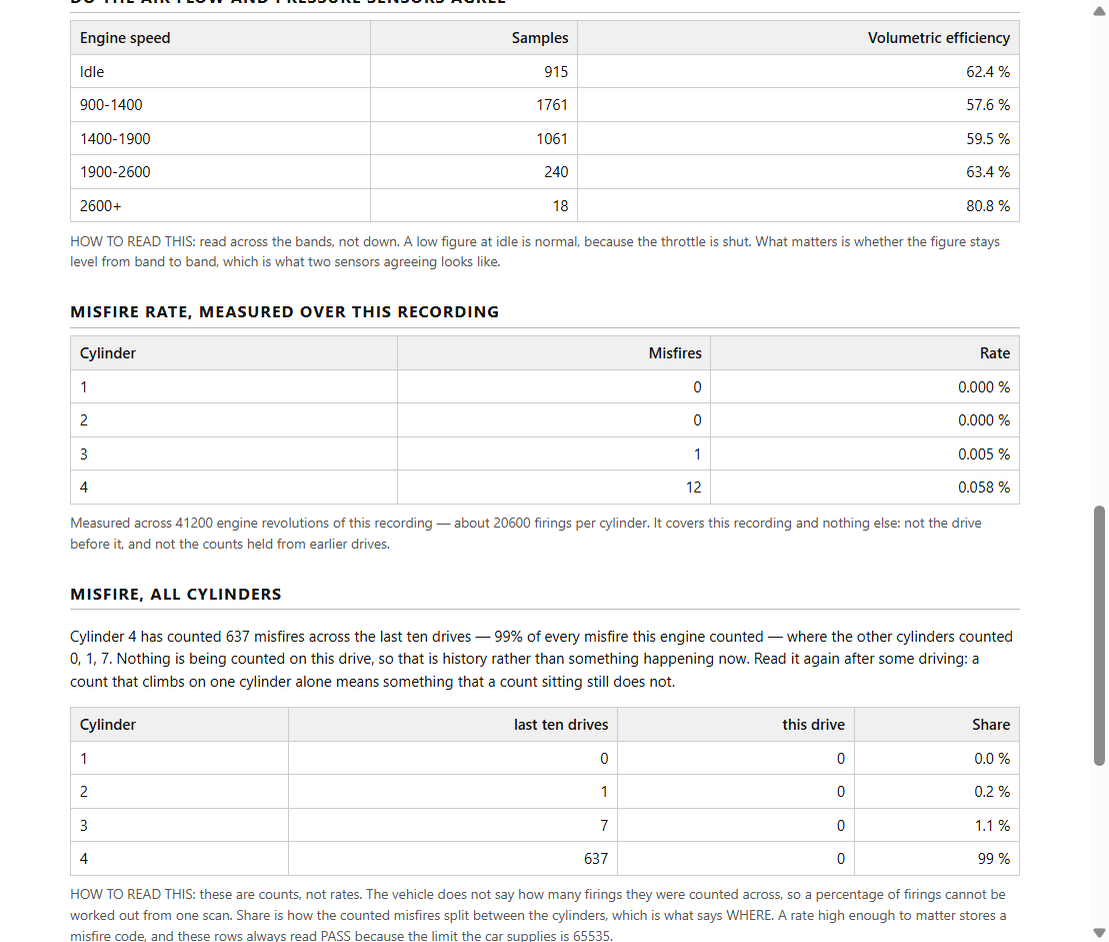
The part that actually cracks a fuel fault. It throws away every sample taken during a throttle transient — trims mean nothing there — and works only from the steady stretches. Then it lays the fuel correction out against air flow: a fixed air leak is a large share of what the engine breathes at idle and a negligible share under load, so its correction fades as air flow rises. A sensor that misreports does not behave that way.
- Idle correction judged against a stated limit of 10%. Whether the air-flow and pressure sensors agree, from volumetric efficiency across the rev range.
- The misfire rate, measured over the recording, per cylinder — not the raw counters the car holds.
- It notices a cold engine, a sensor that never moved, and a long trim frozen at zero, and says so rather than counting them as healthy.
- Every table ends with a HOW TO READ THIS line. The output is sentences, not a verdict.
Vehicle
Trouble codes Free
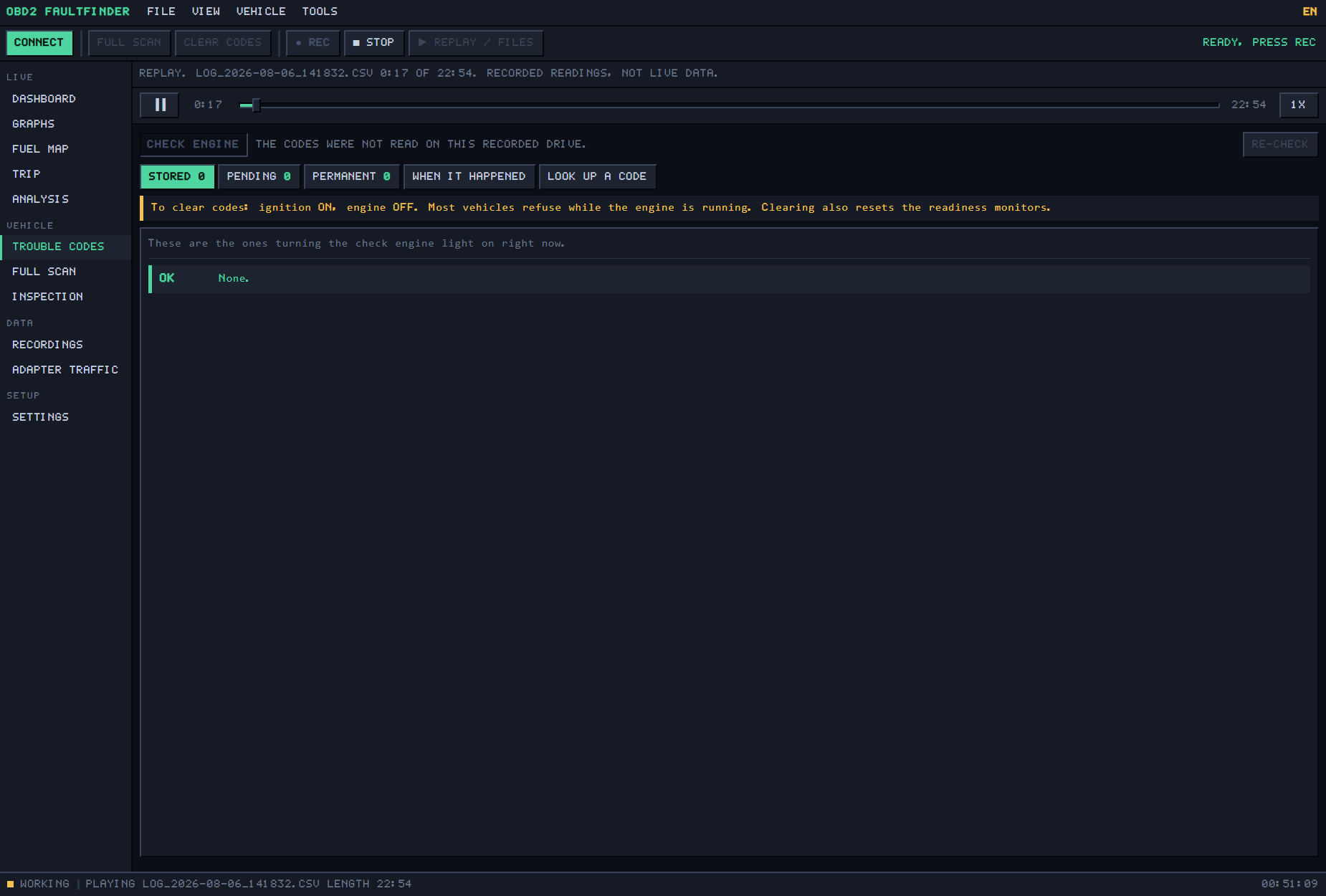
Stored codes are the ones lighting the lamp now. Pending ones have been seen once and not confirmed. Permanent ones cannot be cleared by hand; the car erases them itself when it re-runs the test and passes. Each tab explains that, and each code comes with its meaning in plain language.
- 545 standard codes named, in English and Spanish. A manufacturer-specific code is flagged as one, not guessed at.
- “When it happened” is the freeze frame: every sensor at the moment the code was stored.
- Look up any code with no car attached. Clearing codes needs a key, asks twice, and tells you the readiness monitors reset with them.
Full scan Free
One pass through everything the vehicle will volunteer, written to a file beside your recordings. Vehicle identity first: the VIN decoded on this computer — year, maker, country — and checked against its own check digit, so a misread character is caught. Then the readiness monitors, the freeze frame, and the on-board self-tests with the limits the car judged them against.
- The self-tests include the per-cylinder misfire counters: the last ten drives against this drive, and each cylinder’s share.
- A number whose scaling the standard does not publish is shown raw and labelled raw, rather than converted by guesswork.
- Finishes with a snapshot of every supported sensor. Most of a scan works with the engine off.
Inspection Free
The single most common reason anyone plugs in a scanner: will it pass? The vehicle runs its own self-tests continuously and reports which have finished. This screen turns that into READY, PROBABLY READY or NOT READY, and says why — the lamp is on, there are stored codes, or some monitors have not re-run since the codes were cleared.
- Every monitor listed by name — misfire, fuel system, catalyst, fuel vapour, oxygen sensors and heaters, EGR — with diesel monitors named as diesel monitors.
- It tells you the fuel-vapour test is the fussy one and what it needs. It also says plainly that local rules vary and this is not a legal opinion.
Data
Recordings With a key
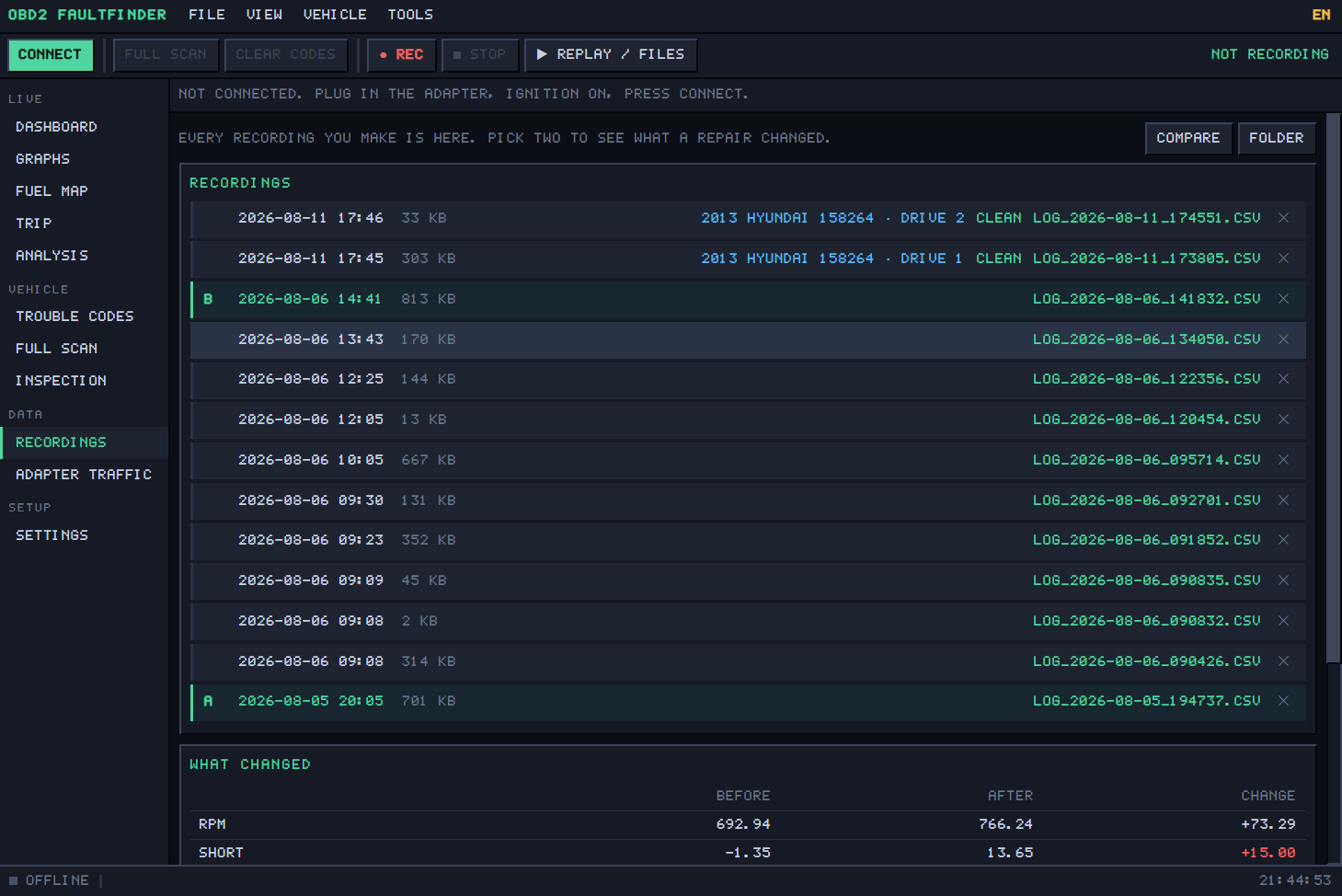
Every drive you have recorded, with the date, the size, the car it came from and its drive number. Pick one to play it back through the live screens — the transport bar scrubs, pauses and runs at up to 8×, and a banner says these are recorded readings, not live ones. Pick two and press COMPARE.
- What changed: the idle figures before, after, and the difference. Codes that went away, codes that appeared, codes still there.
- The vehicle is kept with each recording, so it warns you if the two drives came from different cars.
- Recordings are plain CSV files in a folder you choose. They are yours; nothing is uploaded.
Adapter traffic Free
The raw conversation with the adapter — every command sent and every byte that came back. Most people never open it. It is there for the day a car will not connect, so you can see exactly where the exchange stopped instead of guessing.
Setup
Settings Free
Units by group — temperature, speed, pressure, air flow, fuel — with a metric or imperial quick set. Display only: everything is read and logged in the units the vehicle reports, so changing these never alters what gets flagged or what is already saved.
- Appearance: nine themes, three typefaces, four interface sizes, and gauges as numbers, bars, traces, needles or a cluster.
- Recording: automatic from the moment a car connects, or manual; and where the files go.
- Licence: enter a key, see how many computers it is on, or remove it from this one to use it on the next.
The report
Everything on screen is scattered across a dozen views. A mechanic, a dealer or a buyer wants one document. Save report or Print report in the File menu builds it as a single self-contained page — plain black on white, no pixel font — because it is going to be printed or emailed, not looked at in the program.
- Vehicle identity, the state of the check-engine light, every code with its meaning, the readiness monitors.
- The readings tables, the observations from the analysis, and the misfire rate measured over the recording.
- In English or Spanish — the descriptions and the notes, not just the headings. Switch the program’s language and the report follows.
- The footer says it in so many words: readings are reported as the vehicle gave them, and nothing here names a cause.
What it never does
- It never names the cause. It shows what the engine reports and which readings look wrong; deciding what to replace is yours, or your mechanic’s.
- It never uploads anything. Codes, readings, VIN and recordings stay on your computer. The only thing it ever sends is a licence key, and the free version sends nothing.
- It never invents a reading. An empty fuel-map cell stays empty; an engine-off trim shows “--”; a blank in a recording stays blank on playback.
- It never guesses at a manufacturer code, converts a number it cannot convert honestly, or calls a connection tested before it has met a car.
Free, and with a key
Install it and the whole program runs for 7 days with nothing held back. After that it does not expire and does not nag — it settles into being a free code reader, and one payment of $9.99 unlocks the rest for good.
Free forever
- Live sensors — 30 readings, as numbers, bars or traces
- Trouble codes: read them, see the freeze frame
- Look up any of 545 codes, English or Spanish
- Full scan and emissions readiness
- Dark and light themes
With a key
- Erase the trouble codes
- Record a drive and play it back
- The analysis
- Compare two drives — did the repair work?
- Save or print a report
- Seven more themes, needle and cluster gauges
Questions
Which adapter should I buy?
An ELM327 USB cable, the ordinary $15 kind. It is the one that has recorded whole drives on a real car. If you already own a Bluetooth adapter, pair it in Windows first and it appears as a COM port.
Will it work on my car?
If the car has the OBD2 socket, yes for the standard readings: every car sold in the US since 1996, and most sold elsewhere since the early 2000s. How many of the thirty sensors it reports depends on the car; the program asks, and builds gauges only for what the car actually supports.
Do I need the internet?
No. Reading, recording, analysing and reporting all work with the network unplugged. The internet is used once to activate a key, and for a quiet check when the program starts. That check sends the key and nothing else.
Will it turn off my check-engine light?
With a key it can erase the stored codes, which turns the lamp off. It asks first, and it tells you the readiness monitors reset at the same time. If the fault is still there, the light comes back.
Why does Windows warn me when I run it?
The download is not signed with a certificate yet, so the first time Windows says “Windows protected your PC”. Click More info, then Run anyway. The warning is about how new the file is, not what is inside it.
Linux: it cannot find the adapter.
Linux needs permission to read the USB port. Add yourself to the serial group — dialout on most distributions, uucp on Arch — then log out and back in.